
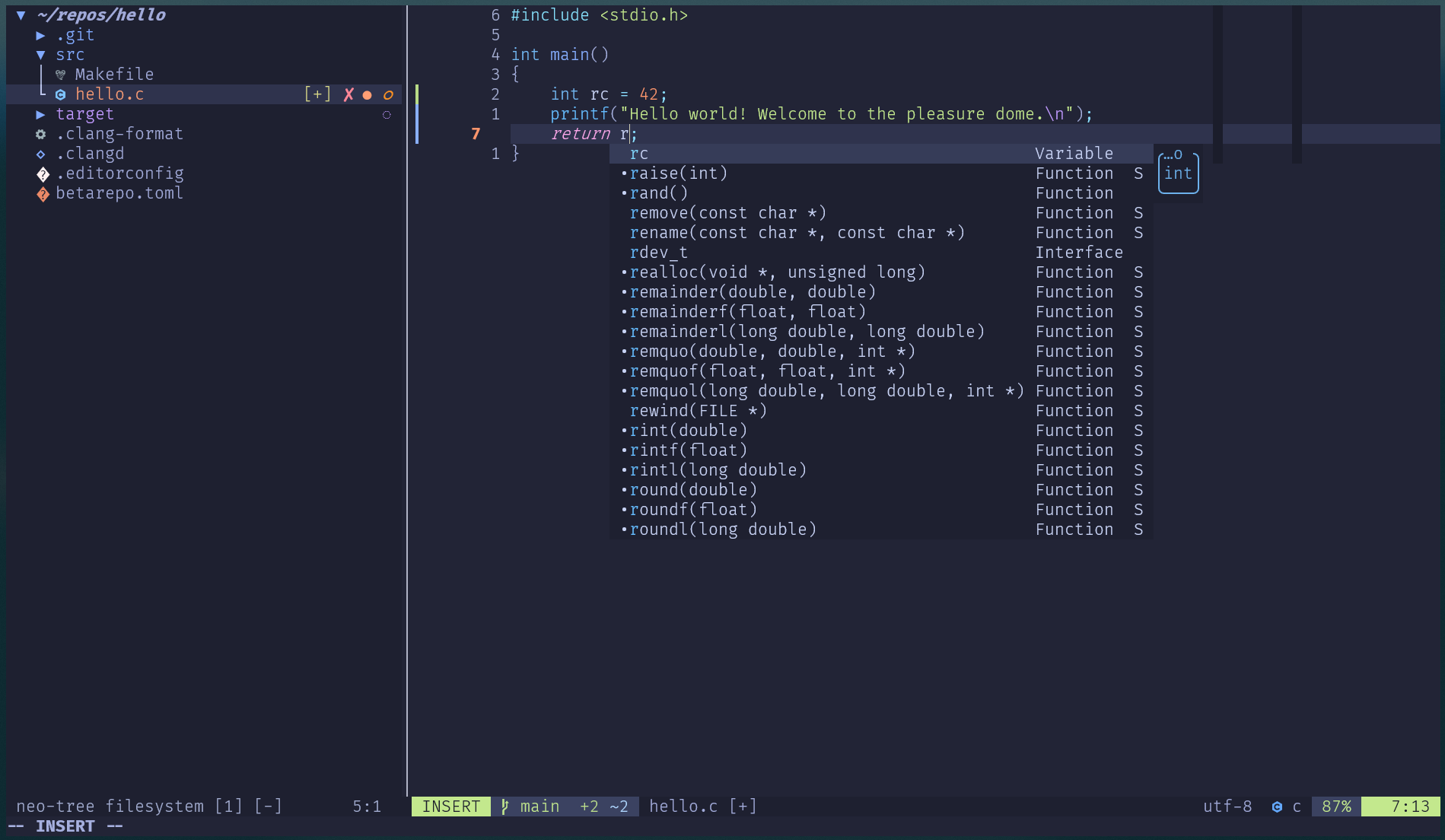
After my three-part VIM series, several readers asked: “What about Neovim?”
Good question – and one I’ve been exploring myself. Neovim offers some compelling advantages: Lua configuration, built-in LSP support since version 0.11, and a more modern plugin ecosystem. The challenge? Getting it to work on z/OS with its unique constraints.
This article presents my current working configuration. I’m using this setup at Beta Systems Software AG for z/OS development. It’s been battle-tested on real projects. If you’ve read my VIM series, you’ll recognize the philosophy: understand what you’re adding, keep it simple, make it yours.
Why Neovim on z/OS?
Neovim 0.11 introduced native LSP support, no plugins required for basic language server integration. Combined with Lua configuration, this means:
- Cleaner, more readable configs than VimScript
- First-class LSP without CoC or similar plugins
- Modern plugin ecosystem
- Better async capabilities
The catch: z/OS has Lua 5.1, not LuaJIT. Many popular plugins require LuaJIT and won’t work. We’ll navigate around this limitation.
Prerequisites
You’ll need:
- z/OS with USS configured (see my Unix environment article)
- Git
- clangd (for C/C++ LSP support)
Installation
zopen install neovim -yCritical: Neovim on z/OS requires a proper terminal setting:
export TERM=xterm-256colorAdd this to your ~/.bashrc or ~/.profile. Without it, colors and UI elements won’t work correctly.
Critical: Neviom will not work correctly when the environment variable VIMRUNTIME is set.
export VIMRUNTIME=$HOME/zopen/usr/local/share/vim/vim91/Remove the line above from your ~/.bashrc or ~/.profile.
Verify the installation:
nvim --version
# Should show:
NVIM v0.11.5
Build type: Release
Lua 5.1
Run "nvim -V1 -v" for more infoConfiguration structure
Neovim can work with a single init.lua file, just like VIM’s .vimrc. However, for better readability and maintainability, we’ll organize our configuration into multiple files:
~/.config/nvim/
├── init.lua              # Entry point
├── lua/
│   ├── options.lua       # Editor settings
│   ├── keymaps.lua       # Key bindings
│   ├── plugins.lua       # Plugin definitions
│   └── config/           # Plugin configurations
│       ├── lualine.lua
│       ├── lsp.lua
│       ├── completion.lua
│       ├── treesitter.lua
│       ├── diff.lua
│       ├── pick.lua
│       └── neotree.lua
└── lsp/
└── clangd.lua # Language server configCreate the directories:
mkdir -p ~/.config/nvim/lua/config
mkdir -p ~/.config/nvim/lspOptions
Create ~/.config/nvim/lua/options.lua:
local opt = vim.opt
-- Line numbers
opt.number = true
opt.relativenumber = true
-- Tabs & indentation
opt.tabstop = 2
opt.shiftwidth = 2
opt.expandtab = true
opt.smartindent = true
-- Search
opt.ignorecase = true
opt.smartcase = true
opt.hlsearch = true
opt.incsearch = true
-- UI
opt.termguicolors = true
opt.cursorline = true
opt.scrolloff = 8
opt.signcolumn = "yes:3"
opt.colorcolumn = "72,80"
opt.winborder = "rounded"
-- Show whitespace
opt.list = true
opt.listchars = {
trail = "·",
tab = "» ",
nbsp = "␣",
}
-- Behavior
opt.splitright = true
opt.splitbelow = true
opt.mouse = "a"
opt.clipboard = "unnamedplus"
opt.completeopt = "menuone,noinsert"
-- Folding
opt.foldmethod = "expr"
opt.foldexpr = "v:lua.vim.lsp.foldexpr()"
-- opt.foldexpr = "v:lua.vim.treesitter.foldexpr()"
opt.foldcolumn = "0"
opt.foldtext = ""
opt.fillchars = 'eob: ,fold: ,foldopen:,foldsep: ,foldclose:'
opt.foldlevel = 99
-- opt.foldlevelstart = 1
opt.foldnestmax = 4
-- No backup/swap files
opt.swapfile = false
opt.backup = false
-- Persistent undo
opt.undofile = true
-- Disable unused providers
vim.g.loaded_python3_provider = 0
vim.g.loaded_ruby_provider = 0
vim.g.loaded_perl_provider = 0
vim.g.loaded_node_provider = 0If you’ve read my VIM series, most of these will be familiar. They’re just written in Lua syntax now. The provider settings disable Python/Ruby/Perl/Node integrations we don’t need, speeding up startup and removing health-check warnings.
Keymaps
Create ~/.config/nvim/lua/keymaps.lua:
vim.g.mapleader = " "
vim.g.maplocalleader = " "

local map = vim.keymap.set

-- Clear search highlight
map("n", "<leader>/", ":nohlsearch<CR>", { desc = "Clear search" })

-- Buffer navigation
map("n", "<C-j>", ":bnext<CR>", { desc = "Next buffer" })
map("n", "<C-k>", ":bprev<CR>", { desc = "Previous buffer" })
map("n", "<leader>bd", ":bdelete<CR>", { desc = "Delete buffer" })

-- Keep selection when indenting
map("v", "<", "<gv", { desc = "Indent left" })
map("v", ">", ">gv", { desc = "Indent right" })

-- Move lines
map("v", "J", ":m '>+1<CR>gv=gv", { desc = "Move line down" })
map("v", "K", ":m '<-2<CR>gv=gv", { desc = "Move line up" })

-- Toggle UI for copying
map("n", "<leader>n", function()
  vim.wo.number = not vim.wo.number
  vim.wo.relativenumber = not vim.wo.relativenumber
  if vim.wo.signcolumn == "yes:3" then
    vim.wo.signcolumn = "no"
  else
    vim.wo.signcolumn = "yes:3"
  end
end, { desc = "Toggle line numbers and signs" })

-- Remove trailing whitespace
map("n", "<leader>tw", [[:%s/\s\+$//e<CR>]], { desc = "Remove trailing whitespace" })The <leader>n toggle is useful when you need to copy text from the terminal. It hides line numbers and the sign column so they don’t get included in your selection.
Plugin manager
Here’s our first z/OS challenge. The popular lazy.nvim plugin manager requires LuaJIT, so it won’t work. Instead, we’ll use paq-nvim: minimal, pure Lua, works with Lua 5.1.
Note: Neovim 0.12 will include a built-in plugin manager. Once that version is ported to z/OS, I’ll write a follow-up article on migrating away from paq-nvim.
Install it:
git clone --depth=1 https://github.com/savq/paq-nvim.git \
"${XDG_DATA_HOME:-$HOME/.local/share}"/nvim/site/pack/paqs/start/paq-nvimCreate ~/.config/nvim/lua/plugins.lua:
require("paq")({
  "savq/paq-nvim",                -- package manager (replaces lazy.nvim)
  "folke/tokyonight.nvim",        -- color theme
  "nvim-lualine/lualine.nvim",    -- status line
  "echasnovski/mini.completion",  -- completion  (replaces blink.nvim)
  "echasnovski/mini.diff",        -- git signs
  "echasnovski/mini.pick",        -- finder
  "echasnovski/mini.icons",       -- dependency
  "nvim-lua/plenary.nvim",        -- dependency
  "nvim-tree/nvim-web-devicons",  -- dependency
  "MunifTanjim/nui.nvim",         -- dependency
  "nvim-neo-tree/neo-tree.nvim",  -- file browser
  "chentoast/marks.nvim",         -- better marks
})You’ll notice several mini.* plugins. The mini.nvim collection is pure Lua and works reliably on z/OS. Many popular alternatives (like gitsigns.nvim, telescope.nvim, blink.cmp) failed due to LuaJIT dependencies or other compatibility issues.
Entry point
Create ~/.config/nvim/init.lua:
require("options")
require("keymaps")
require("plugins")

vim.cmd.colorscheme("tokyonight")

require("config.lualine")
require("config.lsp")
require("config.completion")
require("config.treesitter")
require("config.diff")
require("config.pick")
require("config.neotree")
require("config.marks")

vim.lsp.enable("clangd")
-- vim.lsp.enable({"clangd","bashls","hlasmls"}) -- this way you can enbale mutliple lsp serversStart Neovim and install plugins:
nvim
:PaqSyncRestart Neovim after installation completes.
Plugin configurations
Now let’s configure each plugin.
Statusline
Create ~/.config/nvim/lua/config/lualine.lua:
-- Custom components for whitespace issues
local function trailing_whitespace()
  local space = vim.fn.search([[\s\+$]], "nwc")
  return space ~= 0 and "TW:" .. space or ""
end

local function mixed_indent()
  local spaces = vim.fn.search([[^\s* \t]], "nwc")
  local tabs = vim.fn.search([[^\s*\t ]], "nwc")
  if spaces ~= 0 or tabs ~= 0 then
    return "MI"
  end
  return ""
end

require("lualine").setup({
  options = {
    theme = "tokyonight",
    section_separators = "",
    component_separators = "",
  },
  sections = {
    lualine_a = { "mode" },
    lualine_b = { "branch", "diff" },
    lualine_c = { "filename" },
    lualine_x = {
      { trailing_whitespace, color = { fg = "#ff6666" } },
      { mixed_indent, color = { fg = "#ff6666" } },
      "encoding",
      "filetype",
    },
    lualine_y = { "progress" },
    lualine_z = { "location" },
  },
})This adds two custom indicators that show in red when there are issues: TW:42 means trailing whitespace on line 42, MI means mixed indentation detected.
Completion
Create ~/.config/nvim/lua/config/completion.lua:
require("mini.completion").setup({
  delay = { completion = 100, info = 100, signature = 50 },
  lsp_completion = {
    source_func = "omnifunc",
    auto_setup = true,
  },
})This provides automatic completion popups. Combined with our completeopt setting, it won’t auto-insert. You navigate with Tab/Shift-Tab and confirm with Enter.
Treesitter
Create ~/.config/nvim/lua/config/treesitter.lua:
-- Enable treesitter for supported filetypes
vim.api.nvim_create_autocmd("FileType", {
  pattern = { "c", "cpp", "lua", "vim", "markdown" },
  callback = function()
    pcall(vim.treesitter.start)
  end,
})Neovim 0.11 ships with parsers for several languages. This enables treesitter highlighting for those filetypes. The pcall prevents errors if a parser is missing.
Git diff
Create ~/.config/nvim/lua/config/diff.lua:
require("mini.diff").setup({
  view = {
    style = "sign",
    signs = {
      add = "┃",
      change = "┃",
      delete = "_",
    },
  },
})Shows Git changes in the sign column. If you experience display issues (especially when using tmux, more on that in a future article), fall back to ASCII characters like +, ~, and -.
Fuzzy finder
Create ~/.config/nvim/lua/config/pick.lua:
require("mini.pick").setup()

local map = vim.keymap.set

map("n", "<leader>f", "<cmd>Pick files<cr>", { desc = "Find files" })
map("n", "<leader>b", "<cmd>Pick buffers<cr>", { desc = "Find buffers" })
map("n", "<leader>g", "<cmd>Pick grep_live<cr>", { desc = "Live grep" })
map("n", "<leader>h", "<cmd>Pick oldfiles<cr>", { desc = "Recent files" })We use mini.pick instead of telescope.nvim or fzf-lua because it’s pure Lua with no external dependencies. It just works.
File explorer
Create ~/.config/nvim/lua/config/neotree.lua:
require("neo-tree").setup({
  filesystem = {
    filtered_items = {
      visible = true,
      hide_dotfiles = false,
      hide_gitignored = false,
    },
  },
  default_component_configs = {
    icon = {
      folder_closed = "▶",
      folder_open = "▼",
      folder_empty = "▷",
      default = "◇",
    },
    git_status = {
      symbols = {
        added = "✚",
        modified = "●",
        deleted = "✖",
        renamed = "➜",
        untracked = "◌",
        ignored = "◌",
        unstaged = "○",
        staged = "●",
        conflict = "!",
      },
    },
  },
})

vim.keymap.set("n", "<leader>e", "<cmd>Neotree toggle<cr>", { desc = "File explorer" })Again, if Unicode symbols don’t display correctly in your terminal, replace them with ASCII alternatives like >, v, +, ~, etc.
Better marks
Create ~/.config/nvim/lua/config/marks.lua:
require("marks").setup({})LSP configuration
This is where Neovim 0.11 shines. Native LSP support means no CoC, no external plugins, just configuration.
Language server definition
Neovim 0.11 uses files in ~/.config/nvim/lsp/ to define language servers. For clangd, get the default configuration from nvim-lspconfig:
curl -o ~/.config/nvim/lsp/clangd.lua \
https://raw.githubusercontent.com/neovim/nvim-lspconfig/master/lsp/clangd.luaThis provides sensible defaults for clangd, including file types, root markers, and capabilities. We deliberately curl these config files instead of using nvim-lspconfig as a plugin. This keeps the startup fast and allows us to customize configurations for z/OS-specific needs.
LSP keymaps and diagnostics
Create ~/.config/nvim/lua/config/lsp.lua:
-- Diagnostics configuration
vim.diagnostic.config({
  virtual_text = true,
  signs = {
    text = {
      [vim.diagnostic.severity.ERROR] = "✘",
      [vim.diagnostic.severity.WARN] = "▲",
      [vim.diagnostic.severity.INFO] = "ℹ",
      [vim.diagnostic.severity.HINT] = "➤",
    },
  },
  underline = true,
  update_in_insert = false,
  float = {
    border = "rounded",
    source = true,
  },
})

-- Keymaps on LSP attach
vim.api.nvim_create_autocmd("LspAttach", {
  callback = function(args)
    local opts = { buffer = args.buf }
    local map = vim.keymap.set

    -- Navigation
    map("n", "gd", vim.lsp.buf.definition, opts)
    map("n", "gr", vim.lsp.buf.references, opts)
    map("n", "gi", vim.lsp.buf.implementation, opts)
    map("n", "gy", vim.lsp.buf.type_definition, opts)
    map("n", "K", vim.lsp.buf.hover, opts)

    -- Code actions
    map("n", "<leader>cr", vim.lsp.buf.rename, opts)
    map("n", "<leader>ca", vim.lsp.buf.code_action, opts)
    map("n", "<leader>cf", function() vim.lsp.buf.format({ async = true }) end, opts)

    -- Diagnostics
    map("n", "<leader>dn", vim.diagnostic.goto_next, opts)
    map("n", "<leader>dp", vim.diagnostic.goto_prev, opts)
    map("n", "<leader>dd", vim.diagnostic.open_float, opts)
  end,
})The keymaps only activate when an LSP client attaches to a buffer. No LSP, no keymaps clobbering your normal workflow. If the Unicode symbols for diagnostics don’t display correctly, use ASCII alternatives: E, W, I, H.
Installing clangd
If you haven’t already:
zopen install clangd -y
zopen install clang-format -yVerify:
clangd --versionOther language servers
The same native LSP setup works with other language servers. I also use:
- bash-language-server – for shell scripts, could be installed via npm
- HLASM Language Server – my port from the Eclipse Che4z project, coming to zopen soon
To add another language server, download the corresponding config from nvim-lspconfig:
# Bash language server
curl -o ~/.config/nvim/lsp/bashls.lua \
  https://raw.githubusercontent.com/neovim/nvim-lspconfig/master/lsp/bashls.lua

# HLASM language server (when available)
curl -o ~/.config/nvim/lsp/hlasm.lua \
https://raw.githubusercontent.com/neovim/nvim-lspconfig/master/lsp/hlasm.luaThen enable it in your init.lua:
vim.lsp.enable({"bashls", "hlasm", "clangd")Why curl instead of using nvim-lspconfig as a plugin? Performance. The nvim-lspconfig plugin adds startup overhead. By curling only the configs we need, we keep things lean. You can also customize these files for z/OS-specific settings.
Testing the setup
Open a C file:
nvim test.cCheck LSP status:
:checkhealth vim.lspYou should see clangd as an active client. Now test the features:
Kon a symbol – hover documentationgd– go to definitiongr– find references- Start typing – completion popup appears
Space cf– format code (uses clang-format)Space e– file explorerSpace f– find filesSpace g– live grep
Complete keybinding reference
General:
Space /– Clear search highlightSpace n– Toggle line numbers and signsSpace tw– Remove trailing whitespaceCtrl-j/k– Next/previous bufferSpace bd– Delete buffer
Fuzzy finder:
Space f– Find filesSpace b– Find buffersSpace g– Live grepSpace h– Recent files
File explorer:
Space e– Toggle neo-tree
LSP (when attached):
gd– Go to definitiongr– Find referencesgi– Go to implementationgy– Go to type definitionK– Hover documentationSpace cr– Rename symbolSpace ca– Code actionSpace cf– Format codeSpace dn– Next diagnosticSpace dp– Previous diagnosticSpace dd– Show diagnostic float
z/OS specific notes
What works:
- Native LSP with clangd
- mini.nvim plugin collection
- neo-tree, lualine, tokyonight
- Treesitter (built-in parsers)
What doesn’t work (LuaJIT required):
- lazy.nvim (use paq-nvim instead)
- telescope.nvim (use mini.pick instead)
- blink.cmp (use mini.completion instead)
- gitsigns.nvim (use mini.diff instead)
- GitHub Copilot (native bindings not available)
Key takeaways
- Neovim 0.11’s native LSP eliminates the need for CoC
- Lua configuration is cleaner than VimScript
- z/OS’s Lua 5.1 limits plugin choices – mini.nvim is your friend
- The setup is modular – easy to add, remove, or modify parts
Whether you prefer VIM or Neovim is a matter of personal preference. Both can be excellent IDEs on z/OS. VIM has broader plugin compatibility and a more mature ecosystem with more features available. However, for LSP functionality, Neovim’s native LSP is noticeably faster than VIM with CoC. The Node.js dependency adds significant overhead on z/OS. Neovim also offers a cleaner Lua configuration compared to VimScript.
Related:
- Setting up a modern Unix development environment on z/OS
- VIM Configuration Part 1: Solid Foundations
- VIM Configuration Part 2: Essential Plugins
- VIM Configuration Part 3: IDE Intelligence with LSP
Questions or feedback? Drop a comment below!